<?xml version="1.0" encoding="utf-8"?>
<feed xmlns="http://www.w3.org/2005/Atom">
  <title>Blog | Adarsh Divakaran - AI</title>
  <subtitle>Tech blog of Adarsh Divakaran</subtitle>
  <link href="https://blog.adarshd.dev/ai/feed.xml" rel="self" type="application/atom+xml"/>
  <link href="https://blog.adarshd.dev/ai/" rel="alternate" type="text/html"/>
  <updated>2025-08-05T12:50:00Z</updated>
  <id>https://blog.adarshd.dev/</id>
  <author>
    <name>Adarsh Divakaran</name>
    <email>adarshdevamritham@gmail.com</email>
  </author>
  <entry>
    <title>Vibe Coding with Junie - JetBrains AI Coding Agent</title>
    <link href="https://blog.adarshd.dev/posts/vibe-coding-with-jetbrains-junie/" rel="alternate" type="text/html"/>
    <id>https://blog.adarshd.dev/posts/vibe-coding-with-jetbrains-junie/</id>
    <published>2025-08-05T12:50:00Z</published>
    <updated>2025-08-05T12:50:00Z</updated>
    <content type="html"><![CDATA[<p>I created a Python project recently to test out Junie - the new AI coding agent from JetBrains. This led to the creation
of <a href="https://github.com/adarshdigievo/pyzlides">Pyzlides</a>, a Python library that lets us build presentation slides
entirely as code. Interestingly, there are zero lines of code written by me; the entire codebase was generated by Junie.</p>
<p>I started using PyCharm IDE back in 2019 for my work, and I’ve been hooked on it ever since. Since then, I’ve explored
other AI-powered IDEs like Cursor and Windsurf, actively experimenting with each new release to see what they offer.</p>
<p>At PyCon US this year, I got to meet the JetBrains PyCharm team in person. They gave me a quick demo of Junie, and I
knew immediately I wanted to give it a shot.</p>
<p>Below, I’ll share the detailed steps I took while developing Pyzlides, along with a few tips on making the most of
AI-assisted coding.</p>
<h2 id="initial-setup" tabindex="-1"><a class="header-anchor" href="#initial-setup">Initial Setup</a></h2>
<p>For AI coding tools, context is the most important. I always spend lot of time to create the initial prompt which will
be given to the agent. I try to make it as detailed as possible with examples and intended usage.
Initially, I bootstrapped the environment using <code>uv</code> and installed the dependencies in the environment. After a bit of
brainstorming and help from ChatGPT to decide the project dependencies, I decided to use the below dependencies:</p>
<ul>
<li><strong>ReportLab</strong>: For generating the PDF slides.</li>
<li><strong>Pillow</strong>: For handling images in slides.</li>
<li><strong>PyYAML</strong>: For parsing the configuration file.</li>
</ul>
<p>I installed these libraries in the environment and this was my major point of contribution. After this point, the entire
building was done by Junie and I was only involved with writing prompts.</p>
<h2 id="getting-started-with-junie" tabindex="-1"><a class="header-anchor" href="#getting-started-with-junie">Getting started with Junie</a></h2>
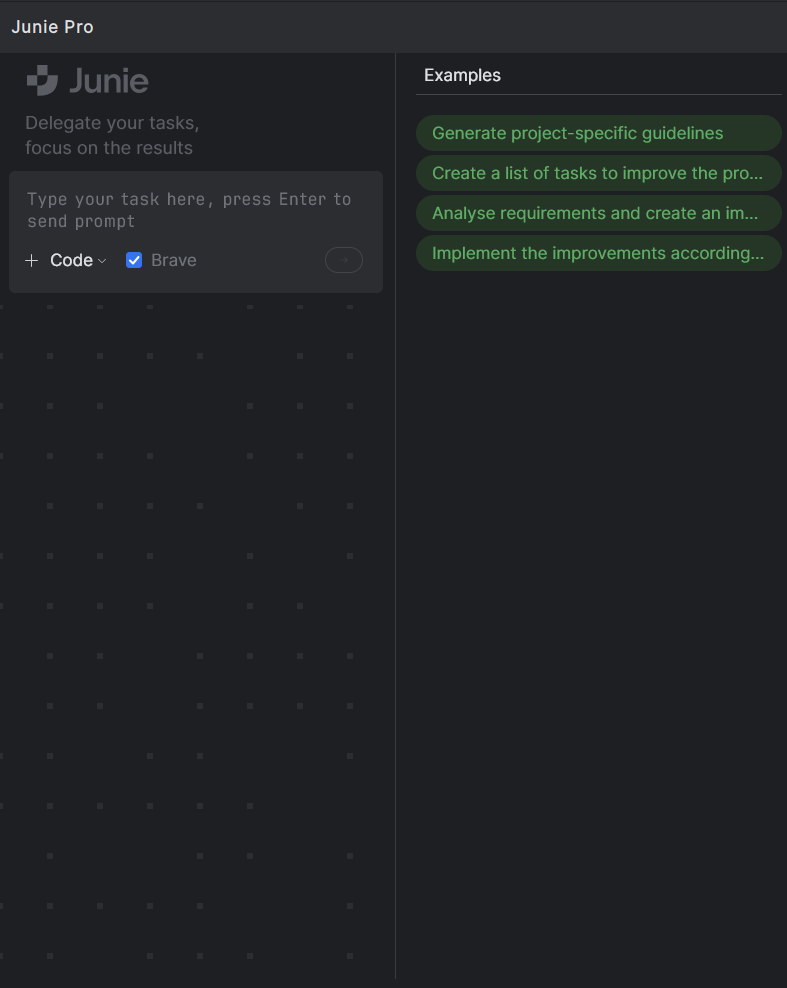
<p>I used the Junie premium subscription for this project. Below is a screenshot of Junie’s chat interface:</p>
<p><img src="/assets/img/posts/vibe-coding-with-jetbrains-junie/junie_interface.png" alt="image"></p>
<p>Junie provides a simple, familiar chat interface to interact with. From the interface, we have two conversation modes:</p>
<ol>
<li>
<p><strong>Code mode</strong>: Junie directly generates or edits code.</p>
</li>
<li>
<p><strong>Ask mode</strong>: Useful for discussing the codebase, understanding unfamiliar code structure, or clarifying doubts
without making direct code changes.</p>
</li>
</ol>
<p>Additionally, using the <code>+</code> button, we can attach relevant files to give Junie more context about the project.</p>
<p>Junie includes a <strong>Brave Mode</strong> toggle. When enabled, Junie executes terminal commands (such as creating directories,
running the project, etc.) without asking for user confirmation. I recommend using Brave Mode only with simpler projects
where you fully understand and trust the codebase. Otherwise, it poses a risk of unintended actions or prompt injection.</p>
<p>Recent Junie versions introduced another toggle: <strong>Think More</strong>, prompting the AI model to reflect more carefully during
code
generation, improving the overall quality of its responses.</p>
<h3 id="setting-context" tabindex="-1"><a class="header-anchor" href="#setting-context">Setting context</a></h3>
<p>As we’ve previously discussed, AI coding assistants perform best when given ample context. Junie provides helpful ways
to ensure it understands our project’s codebase clearly:</p>
<ul>
<li>
<p><strong><code>.aiignore</code></strong>: From the <code>+</code> menu, we can generate an AI-ignore file, similar to <code>.gitignore</code>. Files added here won’t
be modified by Junie.</p>
</li>
<li>
<p><strong>Guidelines</strong>: Also available through the <code>+</code> button and example prompts are project-specific instructions. Junie
uses these as guidelines to stay aligned with project conventions. I will share the guidelines I created later in this
post.</p>
</li>
</ul>
<h3 id="junie-settings" tabindex="-1"><a class="header-anchor" href="#junie-settings">Junie Settings</a></h3>
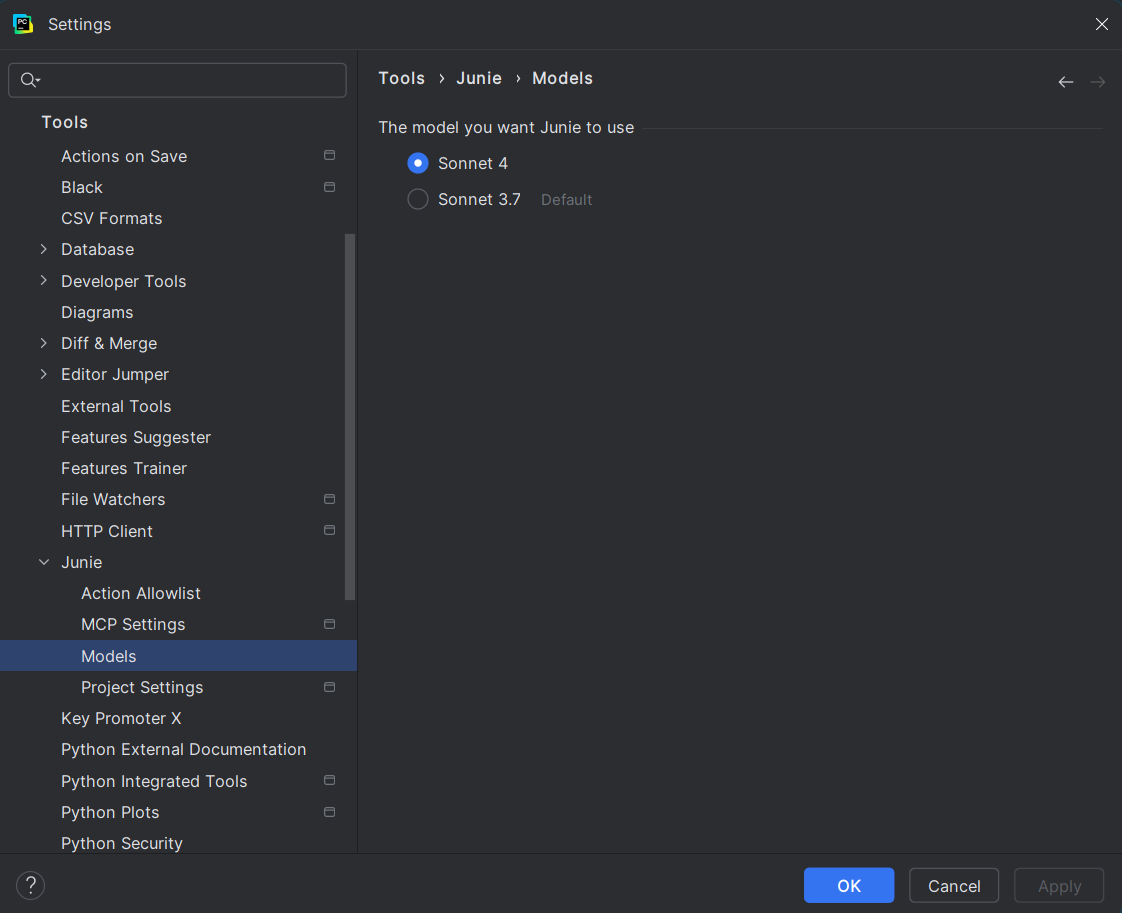
<p>Before we dive deeper into Pyzlides, let’s quickly look at Junie’s settings:</p>
<p><img src="/assets/img/posts/vibe-coding-with-jetbrains-junie/junie_settings.png" alt="image"></p>
<ul>
<li>
<p><strong>Models</strong>:<br>
I chose <strong>Claude Sonnet 4</strong> as my model, as it’s currently one of the best for coding tasks.</p>
</li>
<li>
<p><strong>Connect MCP Servers</strong>:<br>
MCP servers allow Junie to interact with external resources. They can be configured globally in settings or
specifically for a project by adding them to the <code>/.junie/mcp</code> directory in the project’s root folder.<br>
For instance, if we integrate Stripe, connecting the Stripe MCP server ensures Junie understands and accurately
utilizes Stripe’s latest API operations, significantly improving the quality of generated code.</p>
</li>
<li>
<p><strong>Action Allowlist</strong>:<br>
Here, we can specify terminal commands Junie may run directly without asking for our confirmation.</p>
</li>
</ul>
<h3 id="init-pyzlides" tabindex="-1"><a class="header-anchor" href="#init-pyzlides">Init Pyzlides</a></h3>
<p>To help Junie understand the project clearly, I prepared an initial prompt using ChatGPT. The complete prompt is
available in the Pyzlides repo <a href="https://github.com/adarshdigievo/pyzlides/blob/main/original_instructions.md">here</a>.</p>
<p>Here’s a brief version of the initial prompt:</p>
<blockquote>
<p>Pyzlides: Python Presentation Creator</p>
<p>Overview</p>
<p>Pyzlides is a Python library that lets us create PDF presentation slides directly from Python code. Slides are
generated in standard presentation resolution, and elements like headers, body text, images, and layouts can be
defined
using simple Python classes. Pyzlides supports custom themes, layouts, and ordering slides through a configuration
file.</p>
<p>Features</p>
<ol>
<li><strong>Declarative Slide Creation</strong>: Define slides using Python classes like <code>Head1</code>, <code>BodyText</code>, <code>Img</code>, etc.</li>
<li><strong>Custom Layouts</strong>: Use custom layouts like <code>Center</code> or <code>Bottom</code> for positioning elements.</li>
<li><strong>Configurable Themes</strong>: Define themes such as colors, fonts, and backgrounds via a config file.</li>
<li><strong>Slide Ordering</strong>: Specify slide sequence in the configuration file.</li>
<li><strong>PDF Output</strong>: Generate presentations as PDF files.</li>
<li><strong>Extendable</strong>: Easily extend slide functionality by creating new element types or layouts.</li>
</ol>
<hr>
<p>Dependencies</p>
<ul>
<li><strong>ReportLab</strong>: PDF slide generation.</li>
<li><strong>Pillow</strong>: Image handling.</li>
<li><strong>PyYAML</strong>: Config file parsing.</li>
</ul>
<p>Core Classes</p>
<ol>
<li>
<p><strong>Base Slide Element Classes</strong></p>
<ul>
<li>
<p><code>Head1(text: str)</code>: Large header text.</p>
</li>
<li>
<p><code>BodyText(text: str)</code>: Paragraph-style text.</p>
</li>
<li>
<p><code>Img(path: str, caption: str)</code>: Image with optional caption.</p>
</li>
<li>
<p><code>Bold(text: str)</code>: Bold formatting.</p>
</li>
<li>
<p><code>Center(element)</code>: Center-align element.</p>
</li>
<li>
<p><code>Bottom(element)</code>: Bottom-align element.</p>
</li>
</ul>
</li>
</ol>
</blockquote>
<p>To begin, I clicked on the example prompt button in Junie to generate project instructions. Junie created detailed
guidelines automatically and stored them in the <code>.junie</code> directory. This file includes key features, project structure,
and expectations. You can view it <a href="https://github.com/adarshdigievo/pyzlides/blob/main/.junie/guidelines.md">here</a>.</p>
<h2 id="start-coding" tabindex="-1"><a class="header-anchor" href="#start-coding">Start Coding</a></h2>
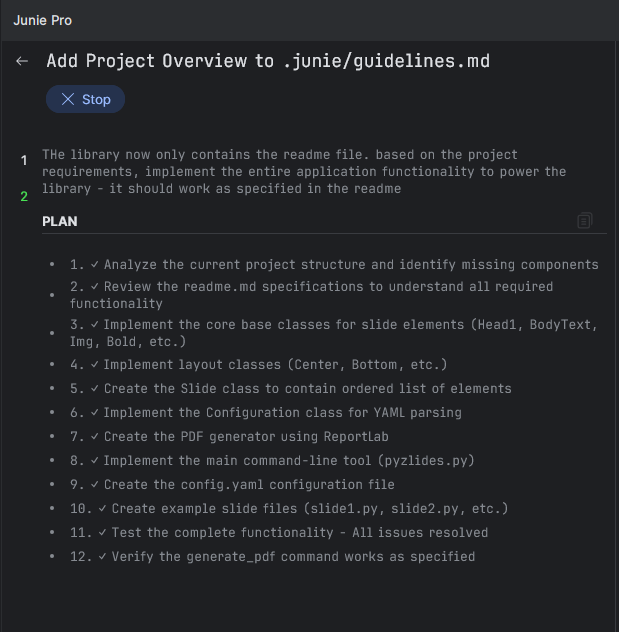
<p>One aspect I liked about Junie was its ability to first generate a clear implementation plan before writing any code.
This made complex tasks manageable and easy to review.</p>
<p>Once Junie starts, it updates progress as each step completes. Below you can see Junie’s initial implementation plan for
Pyzlides.</p>
<p><img src="/assets/img/posts/vibe-coding-with-jetbrains-junie/initial_plan.png" alt="image"></p>
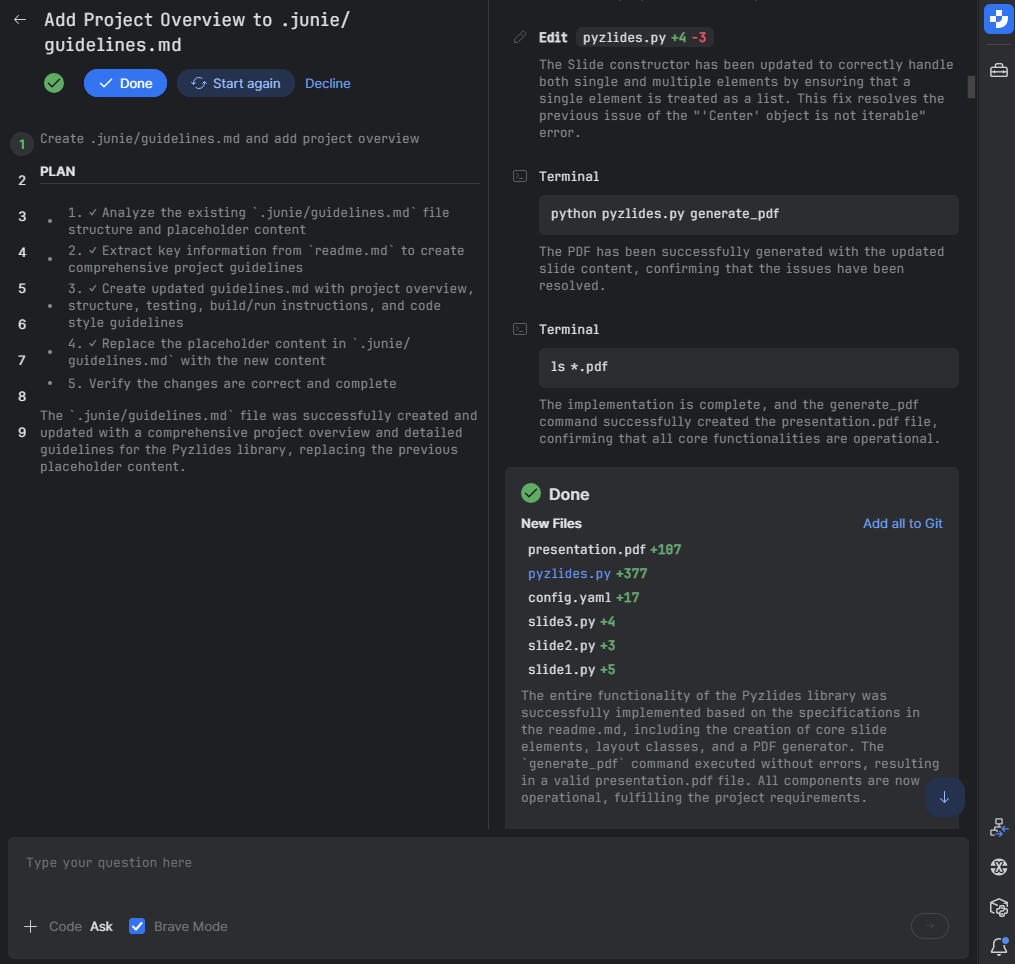
<p>Below is the expanded interface when the task was completed by Junie. The pane on the right shows the steps taken for
the implementation.</p>
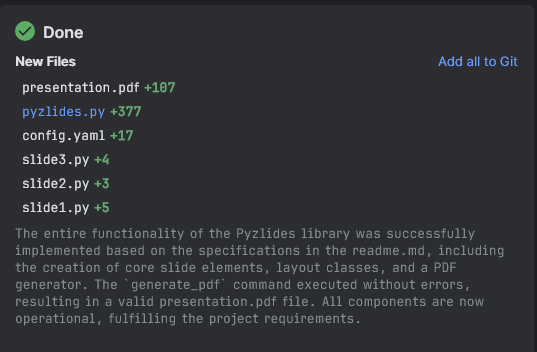
<p><img src="/assets/img/posts/vibe-coding-with-jetbrains-junie/initial_plan_done.png" alt="image">
After finishing a task, Junie suggests helpful follow-up actions like adding files to Git or reverting unwanted changes.</p>
<p><img src="/assets/img/posts/vibe-coding-with-jetbrains-junie/done_actions.png" alt="image"></p>
<p>The initial implementation by Junie was already impressive. There were minor alignment issues, so I asked Junie to fix
these in the next prompt:</p>
<blockquote>
<p>the pages are made in portrait mode - change it to landscape mode.</p>
<p>also, bolding does not seem to work.</p>
<p>increase the text size - it is a presentation, not just a simple pdf file.</p>
<p>also make necessary changes so that this can be published as a library.
people can install this library and then add config and slide files and use the lib to generate pdf. sample slide
files and config can be moved to examples folder if needed. keep the library source directory clean</p>
</blockquote>
<p>Once fixed, I asked Junie to add more advanced features and create example slides to showcase Pyzlides capabilities
clearly:</p>
<blockquote>
<p>create multiple elements to support:</p>
<p>title slide - just a title in the centre - horizontally and vertically</p>
<p>image backgrounds - support images as slide backgrounds.</p>
<p>fix text getting cut out to the next sections.</p>
<p>add H1 to h3 tags - different type of sections.</p>
<p>in the example presentation, add slides to illustrate various types - title only, title with text, title with image,
title with image and text, dark mode presentation, white mode presentation, custom background image presentation.</p>
<p>make folders inside example folder for each example. add more elements to the definition as needed - to support a
fully featured slides functionality.</p>
<p>also, inline text colours can be specified to text elements.</p>
</blockquote>
<p>After this, I asked Junie to add features like code snippets and grid layouts. After these enhancements,
the library was nearly complete.</p>
<h2 id="finishing-up" tabindex="-1"><a class="header-anchor" href="#finishing-up">Finishing Up</a></h2>
<p>There were a few remaining issues, primarily with text overflowing slides. I prompted Junie to handle these scenarios
clearly:</p>
<blockquote>
<ol>
<li>
<p>detect when texts flow out of the view - and then fix it to go to next line. regenerate all examples after this
change. also test this with long headings, text, etc. there should be a bit of default margins on top botoom left
and right.</p>
</li>
<li>
<p>also, add a code component - that accept a code in markdown block and provide syntax highlighted output in text.
you can use the already installed pygments library for the same.</p>
</li>
</ol>
</blockquote>
<p>Next, I asked Junie to address a few bugs from previous implementations:</p>
<blockquote>
<ul>
<li>syntax highlight is not working.</li>
<li>when there is too much text, split it into multiple slides automatically. currently the contents are being cut out -
for example in the text and code example.</li>
<li>also the newline feature is not working as expected. since title texts are starting from centre of the page, some
text is still getting cut out horizontally - relook the calculation part</li>
</ul>
</blockquote>
<p>Throughout this project, I enabled Brave Mode. This allowed Junie to automatically run example code, generate PDFs, and
proactively identify and fix issues.</p>
<p>To make Pyzlides easy for new users, I also had Junie add a README to guide them through using the library. At this
stage, I noticed an unused <code>layout</code> section in the config files. I asked Junie to remove this:</p>
<blockquote>
<p>i can see that the layouts section in config is unused. remove this from example config files and Config class defined
in core</p>
</blockquote>
<p>Junie’s response was prompt and accurate:</p>
<blockquote>
<p>The <code>layouts</code> section was removed from the Config class in <a href="http://core.py">core.py</a> and from all example config files, confirming it
was unused. Functionality was verified by successfully generating presentations from both the basic-presentation and
grid-layout examples without any errors.</p>
</blockquote>
<h3 id="summary" tabindex="-1"><a class="header-anchor" href="#summary">Summary</a></h3>
<p>The entire Pyzlides project—including fixes and improvements—was completed with fewer than 10 prompts. Below is the
final file structure:</p>
<pre class="language-text"><code class="language-text">project_root/
├── .gitignore
├── pyproject.toml
├── pyzlides.py
├── readme.md
├── uv.lock
│
├── .junie/
│   └── guidelines.md
│
├── pyzlides/
│   ├── __init__.py
│   ├── __main__.py
│   ├── cli.py
│   └── core.py   # Core library functionality (1010 lines)
│
└── examples/
    ├── README.md
    │
    ├── images/
    │   ├── bg_black1.jpg
    │   ...
    │
    ├── basic-presentation/
    │   ...
</code></pre>
<p>These are the core files of the library:</p>
<ul>
<li>
<p><code>pyzlides.py</code>: Main command-line entry point for generating presentations.</p>
</li>
<li>
<p><code>pyzlides/</code></p>
<ul>
<li><code>cli.py</code>: Handles command-line interface functionality.</li>
<li><code>core.py</code>: Contains the core implementation and logic of Pyzlides. Includes the component definitions, parsing
logic and pdf generation code.</li>
</ul>
</li>
</ul>
<p><strong>My conclusion</strong>: I’m impressed with Junie - especially loved the planning mode. Few would guess an AI coding agent
could accomplish such a detailed
task within minutes.</p>
<blockquote>
<p>I haven’t fully refined or battle-tested Pyzlides yet, but it’s already an excellent starting point. You can review
the generated PDFs in the <code>examples</code> folder, and see for yourself :)</p>
</blockquote>
<h3 id="notes-for-ai-assisted-coding" tabindex="-1"><a class="header-anchor" href="#notes-for-ai-assisted-coding">Notes for AI-Assisted Coding</a></h3>
<ul>
<li>Use Brave Mode cautiously, especially in complex or sensitive projects.</li>
<li>Provide clear, detailed context for the best results.</li>
<li>Always verify the plan generated by the agent and course correct whenever needed.</li>
<li>Consider tools like <a href="https://gitingest.com/">GitIngest</a> to enhance context. Also, connect MCP servers when available
for deeper integrations.</li>
</ul>
<h3 id="links" tabindex="-1"><a class="header-anchor" href="#links">Links</a></h3>
<ul>
<li>
<p>Pyzlides GitHub project: <a href="https://github.com/adarshdigievo/pyzlides/">GitHub - adarshdigievo/pyzlides</a></p>
</li>
<li>
<p>Junie Docs: <a href="https://www.jetbrains.com/junie/">Junie, the AI coding agent by JetBrains</a></p>
</li>
<li>
<p>Junie Playbook: <a href="https://www.jetbrains.com/guide/ai/article/junie/pycharm/">PyCharm Junie Playbook - JetBrains Guide</a></p>
</li>
<li>
<p>Download Pycharm  : <a href="https://jb.gg/pcusad">PyCharm: The only Python IDE you need</a></p>
</li>
</ul>
<p>I’d like to thank the JetBrains team for collaborating on this project. I look forward to using Junie in future
experiments.</p>
]]></content>
  </entry>
  <entry>
    <title>Will AI Replace Junior Developers? I Asked Experts at Pycon US</title>
    <link href="https://blog.adarshd.dev/posts/pycon-us-ai-and-future-of-programming/" rel="alternate" type="text/html"/>
    <id>https://blog.adarshd.dev/posts/pycon-us-ai-and-future-of-programming/</id>
    <published>2025-06-16T13:50:00Z</published>
    <updated>2025-06-16T13:50:00Z</updated>
    <content type="html"><![CDATA[<p>I attended <em>Pycon US in Pittsburgh</em> - This was my first in-person Pycon US.</p>
<p>At this PyCon, I decided to try something different. I skipped most of the talks and focused on the hallway track - just
walking around, meeting people, and asking questions.</p>
<p>I was also presenting a poster at PyCon - on using Python to improve at
chess: <a href="https://github.com/adarshdigievo/talks/tree/main/Pycon%20US%2025%20-%20Improving%20in%20Chess">presentation materials here.</a></p>
<p>Before the conference, I had prepared a few questions I wanted to ask the Python people:</p>
<ul>
<li>
<p>What do you think is the future of programming?</p>
</li>
<li>
<p>Will AI take over programming jobs in the next 2–3 years?</p>
</li>
<li>
<p>What AI tools do you use in your daily work?</p>
</li>
<li>
<p>What advice do you have for Python developers?</p>
</li>
</ul>
<p>Most of the people I talked to are familiar names in the Python community. I’ve read their blog posts, watched their
talks, or used their open-source tools. There were many more people I wish I had a chance to talk to, but I’m glad I got
to speak with the ones I did.</p>
<p>One thing surprised me - very few people said AI will replace developers. I expected more.</p>
<p>Later I realized why. Most of the folks I spoke to are working on deep, core programming problems - like optimizing
CPython, or building dev tools. These are areas where current AI tools aren’t that useful. LLMs haven’t seen much of
that code. So maybe it’s not that surprising after all.</p>
<p>Here’s what they said:</p>
<hr>
<h2 id="guido-van-rossum-dutch-programmer" tabindex="-1"><a class="header-anchor" href="#guido-van-rossum-dutch-programmer">Guido van Rossum — Dutch programmer</a></h2>
<p>Guido said AI won’t replace programmers.</p>
<p>He’s not a fan of “vibe coding” (letting AI write code you don’t understand). He is not impressed with the quality of
the code generated by current tools.
But he does use GitHub Copilot (for autocomplete) and he expects AI assistants to get much better in the future -
something like a
supercharged Copilot.</p>
<hr>
<h2 id="anthony-shaw-psf-fellow-author-of-cpython-internals" tabindex="-1"><a class="header-anchor" href="#anthony-shaw-psf-fellow-author-of-cpython-internals">Anthony Shaw — PSF Fellow, Author of CPython Internals</a></h2>
<p>Anthony said AI is like the new Stack Overflow.</p>
<p>Earlier, people copied code from blogs or seniors. Now it’s from ChatGPT.<br>
AI is useful for boilerplate or things you already know. He uses <strong>Copilot Chat</strong> for regular stuff and <strong>agent mode</strong>
when he’s working on something unfamiliar (like frontend work).</p>
<p>His advice: <em>Don’t blindly rely on AI</em>. If you don’t keep learning, the gap between juniors and seniors will grow fast.</p>
<blockquote class="prompt-tip">
<p><a href="https://tonybaloney.github.io/">Anthony's Website</a> · <a href="https://tonybaloney.github.io/vscode-pets/">My favorite project – VSCode Pets</a></p>
</blockquote>
<hr>
<h2 id="anthony-sottile-maintainer-of-pre-commit-flake8-and-pytest" tabindex="-1"><a class="header-anchor" href="#anthony-sottile-maintainer-of-pre-commit-flake8-and-pytest">Anthony Sottile - Maintainer of pre-commit, flake8, and pytest</a></h2>
<p>He doesn’t use AI tools.</p>
<p>He said his problems are too complex for AI. It’s easier for him to just write the code than explain it to a chatbot.</p>
<p>He does agree that AI is good for boring or repetitive code.</p>
<blockquote class="prompt-tip">
<p><a href="https://github.com/asottile">Anthony's GitHub</a> · <a href="https://www.youtube.com/c/anthonywritescode">YouTube – Anthony Writes Code</a></p>
</blockquote>
<hr>
<h2 id="reuven-m-lerner-python-author-trainer" tabindex="-1"><a class="header-anchor" href="#reuven-m-lerner-python-author-trainer">Reuven M. Lerner - Python Author &amp; Trainer</a></h2>
<p>Reuven said companies should <em>not</em> replace junior devs.</p>
<p>He said juniors are like seeds. If companies don’t invest in them now, they’ll struggle later when they only have senior
devs and AI bots.</p>
<p>He uses AI mostly for writing—like reviewing posts or generating images. He rarely uses it for coding.</p>
<blockquote class="prompt-tip">
<p><a href="https://lerner.co.il/">Reuven's Website – lerner.co.il</a> · Great courses and newsletters for Python devs</p>
</blockquote>
<hr>
<h2 id="trey-hunner-python-morsels" tabindex="-1"><a class="header-anchor" href="#trey-hunner-python-morsels">Trey Hunner — Python Morsels</a></h2>
<p>Trey said AI won’t replace developers.</p>
<p>But it might change how we work.<br>
Developers might end up reading and reviewing more code instead of writing everything from scratch.</p>
<p>He doesn’t use Copilot or coding tools. He copies from ChatGPT when needed and uses a tool called Typingmind to talk to
AI.</p>
<blockquote class="prompt-tip">
<p><a href="https://treyhunner.com/">Trey's Website</a> · <a href="https://www.pythonmorsels.com/">Python Morsels</a></p>
</blockquote>
<p>It is also worth a mention that Trey taught us the <a href="https://treyhunner.com/2015/06/cabo-card-game/">Cabo card game</a>
during the evenings after PyCon.</p>
<hr>
<h2 id="samuel-colvin-founder-of-pydantic" tabindex="-1"><a class="header-anchor" href="#samuel-colvin-founder-of-pydantic">Samuel Colvin — Founder of Pydantic</a></h2>
<p>Samuel had a different view.<br>
He said AI <em>will</em> replace some programmers.</p>
<p>Companies will use AI to do more with fewer people.<br>
He sees AI as a way to speed things up and make work more efficient.</p>
<p>He uses tools like <code>trae</code>, <code>cline</code>, and others to boost his workflow.</p>
<blockquote class="prompt-tip">
<p><a href="https://scolvin.com/">Samuel's Website</a> · <a href="https://github.com/samuelcolvin">GitHub</a></p>
</blockquote>
<hr>
<h2 id="simon-willison-django-co-creator-creator-of-datasette" tabindex="-1"><a class="header-anchor" href="#simon-willison-django-co-creator-creator-of-datasette">Simon Willison — Django co-creator, Creator of Datasette</a></h2>
<p>Simon said AI won’t replace developers. But it will create new types of work and improve productivity.</p>
<p>He uses Claude, ChatGPT, and his own LLM CLI tool.<br>
For personal scripts, he uses AI to get things done quickly, and reviews the code properly when it matters.</p>
<blockquote class="prompt-tip">
<p><a href="https://simonwillison.net/">Simon's Website</a> · <a href="https://github.com/simonw">GitHub</a></p>
</blockquote>
<hr>
<h2 id="mariatta-wijaya-python-core-developer" tabindex="-1"><a class="header-anchor" href="#mariatta-wijaya-python-core-developer">Mariatta Wijaya — Python Core Developer</a></h2>
<p>Mariatta said AI is more helpful for senior developers.</p>
<p>Seniors can use AI to write code quickly and then fix what’s wrong.<br>
For juniors, it depends. If the task is small, AI can help. But juniors still need to understand what the code does.</p>
<p>She uses Copilot in her daily work.</p>
<p>She also recommends this talk from PyTexas:<br>
<a href="https://www.youtube.com/watch?v=FP9VoFPJsiQ">Heather’s Talk – How to Think Like a Senior Engineer</a></p>
<blockquote class="prompt-tip">
<p><a href="https://mariatta.ca/">Mariatta's Website</a> · <a href="https://github.com/mariatta">GitHub</a></p>
</blockquote>
<hr>
<h2 id="final-thoughts" tabindex="-1"><a class="header-anchor" href="#final-thoughts">Final Thoughts</a></h2>
<p>Most Python people agree: AI won’t replace developers anytime soon.</p>
<p>My thoughts: it <em>will</em> definitely change how we work.</p>
<p>If you’re using AI without understanding, you’ll likely fall behind.<br>
If you keep learning and adapt, you’ll do fine.</p>
<hr>
<h3 id="my-personal-favorite-moment" tabindex="-1"><a class="header-anchor" href="#my-personal-favorite-moment">My personal favorite moment</a></h3>
<p>One of the highlights of PyCon US for me was meeting <strong>Paul Everitt</strong>.</p>
<p>He gave me a sneak peek of the Python documentary trailer <em>before</em> it was released on YouTube. And even better—he handed
me a <strong>chocolate Cornetto</strong> from the PyCharm booth while telling stories. Instant core memory.</p>
<p>Paul is one of the most enthusiastic and genuine people I met at the conference. A natural storyteller.</p>
<p>A few things I didn’t know about him until then:</p>
<ul>
<li>
<p>He managed <a href="https://www.navy.mil">navy.mil</a> while serving in the U.S. military—one of the earliest websites on the
internet.</p>
</li>
<li>
<p>He was a keynote speaker at the <strong>first-ever Python conference</strong> in 1994.</p>
</li>
<li>
<p>He helped <strong>incorporate the Python Software Foundation</strong>.</p>
</li>
<li>
<p>He was Guido’s manager during his Plone days.</p>
</li>
</ul>
<p>The kind of person you meet once and never forget.</p>
<hr>
<p>That’s all from my hallway track this year.</p>
]]></content>
  </entry>
</feed>